Local-first · Windows · Free tier, no account

A word processor that cites from your own PDFs, offline.

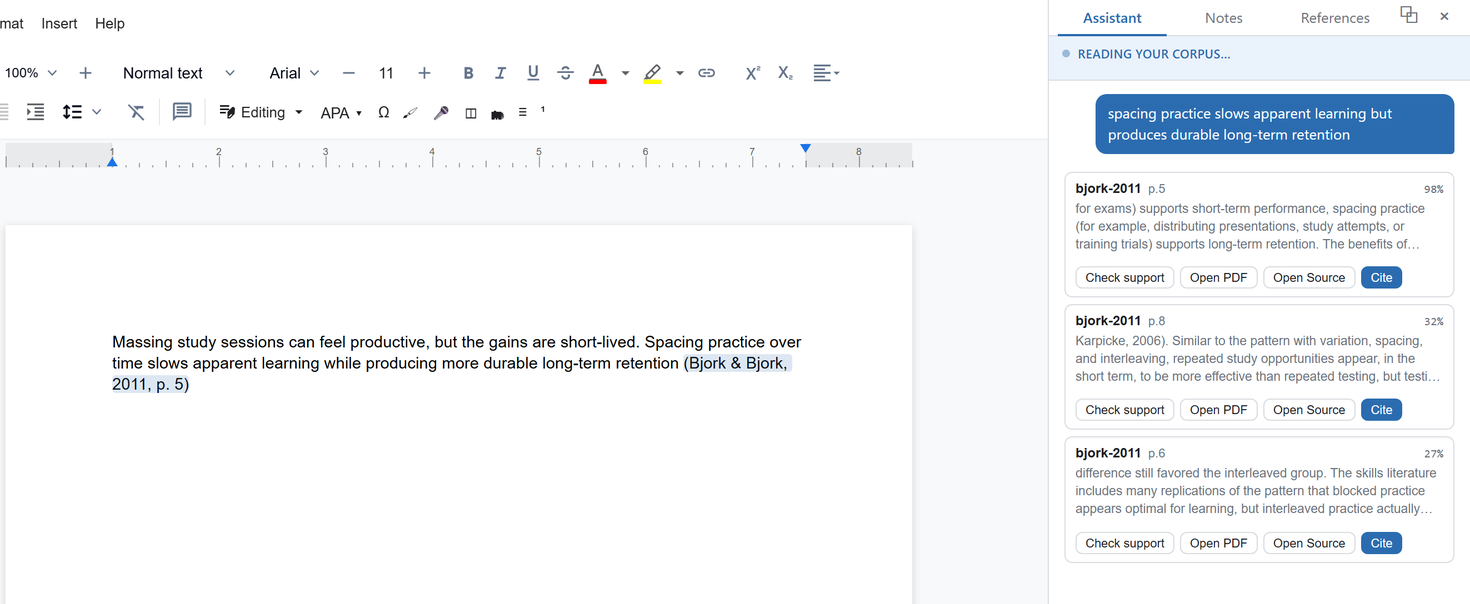
Draft with a local AI model, cite passages from PDFs you already own, and click any citation to open the exact page it came from. Runs on your machine. The free tier needs no account. Windows.
Windows 10 & 11 · 64-bit Free. No account.
Vivascri: a cited sentence in the editor, with the matching passages from the writer's own PDF library in the side panel
Nothing leaves your computer.
01 The proof: a citation receipt

Every citation, grounded to a page.

Click any citation and Vivascri opens the exact page it came from, a passage in a PDF you already own. No web lookup. No upload. Checked on your machine.

Your draft

“Desirable difficulties such as spacing and retrieval practice slow apparent learning but improve long-term retention (Bjork & Bjork, 2011, p. 5).”
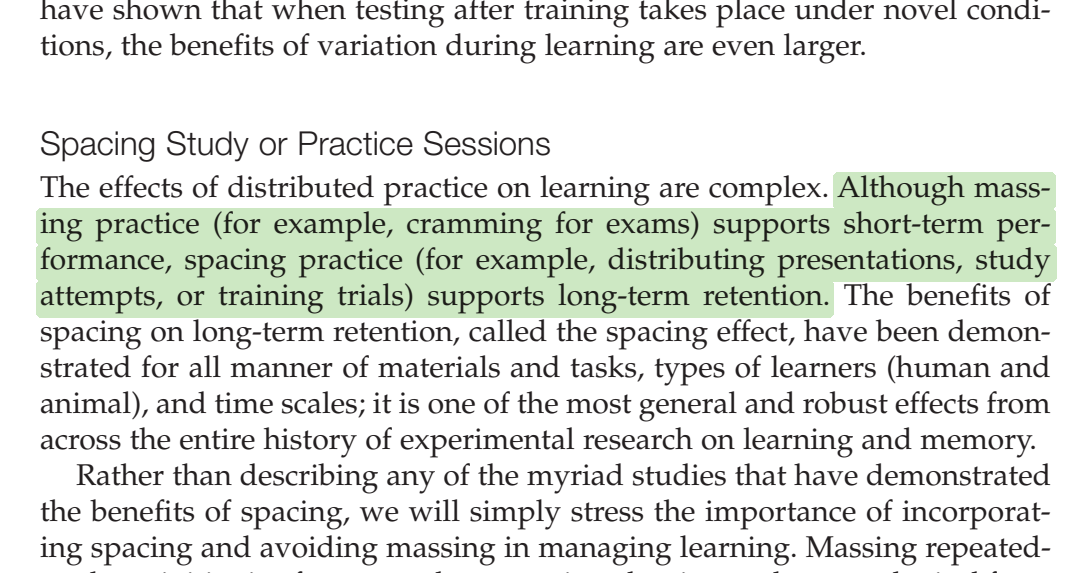
opens
bjork-2011.pdf page 5
The Bjork and Bjork 2011 PDF, page 5, with the cited passage highlighted
Grounded & verified locally. No web lookup, no upload, no invented sources.

Grounded

Citations are generated from your PDFs and pinned to the page. No hallucinated references. Proof you can open.

Private

Local and offline by default. Your drafts and your library never leave your computer. The free tier has no account, and nothing phones home except a paid tier's licence check.

Yours

A real word processor and your own files. The free tier needs no account, and your work exports clean to the formats you already rely on.

02 How it works
01

Add your library

Drop in the PDFs you already own: papers, books, notes. They stay on your disk.

02

Write

Draft in a real editor, with an AI model running locally to help you think and phrase.

03

Cite with proof

Every claim links to an exact page you can open and verify. Grounded, not guessed.

04

Own your work

Export clean documents and citations. Nothing was uploaded; nothing phones home.

03 Features

A real word processor

Styles, headings, footnotes, and clean export to Word (.docx) with your reference list. Not a toy chat box.

Grounded citations

Pinned to the exact page in your own PDFs, in APA, MLA, Chicago, or Harvard, so every reference is verifiable at a click.

Local AI drafting

A model runs on your machine to help draft and revise. No data sent anywhere.

Offline & private

No telemetry, no upload. The free app needs no account and works with your Wi-Fi off; paid tiers only go online to confirm their licence.

Your own library

Build your library your way: drop in PDFs you own, or paste a DOI, arXiv link, or URL and Vivascri pulls a clean open-access copy. Every citation is grounded in that local library, pinned to the page.

Coming soon · optional

More power, when you want it

Sharper neural retrieval and priority support as optional upgrades, layered on the free offline core.

04 Privacy

This site practices the privacy it preaches.

Vivascri is built local-first. The free app needs no account and sends nothing. The only network calls are ones you start yourself, like fetching a model or adding a paper by link, plus a licence check for paid tiers.

No account for the free app
Download and write. We never ask who you are.
No telemetry, no upload
Your drafts and PDFs stay on your disk. Paid tiers make one kind of outbound call: checking their licence key.
Opt-in cloud AI, clearly labelled
Connect Claude or GPT with your own key and the app shows it while it is on. Off by default. Paid-tier retrieval still runs locally.
No analytics, no cookies
No tracking script, no cookies, no fake numbers on this page.
05 Who it's for

Students

Write essays and theses with citations you can defend, and keep your drafts to yourself.

Researchers

Draft from your own paper library, with every reference pinned to the page it came from.

Any serious writer

Anyone working from sources who wants accuracy, ownership, and privacy in one place.

06 Pricing

Free to write. Pay for sharper sources.

Free

Start here
$0
Local, offline, no account. Forever.
Full word processor & export Grounded citations from your PDFs Local AI drafting
Download for Windows
Most popular

Scholar

$59/year
USD, billed yearly (about $5 a month), or $7 month to month. Cancel any time.
Students: 40% off, email us from your school address
Everything in Free, unlocked with a licence key Neural re-ranking for sharper, more relevant sources Query expansion + iterative grounding for hard questions
Coming soon

Pro

$99/year
USD, billed yearly, or $12 month to month. Planned price; opens when Pro ships.
Team seats later
Everything in Scholar GPU-class retrieval with a larger embedding model Priority updates and support
Coming soon
Indicative pricing · not final Paid tiers are subscriptions, yearly or monthly, sold through Lemon Squeezy with a licence key that checks in online now and then. Students get 40% off: email support@vivascri.com from your school address. The free app is local and offline with no account.
07 FAQ

Straight answers.

The free tier is free, local, and offline, with no account. The paid tiers add stronger retrieval models that also run on your machine; they come with a licence key from our payment provider, Lemon Squeezy, which the app verifies online occasionally. You never need a paid tier to write and cite.
No. Writing, your PDF library, search, citations, and AI drafting all run on your machine. The only network calls are ones you start yourself: downloading an AI model, or adding a paper by DOI or link, which fetches a free open-access copy. If you connect a cloud AI (Claude or GPT) in Settings, your text goes to that provider; that is off by default and clearly marked. Paid tiers verify their licence key online now and then, sending the key and nothing about your documents. No telemetry, nothing else uploaded.
Twice. Once to download the app, and once on first launch, when it fetches a small AI model (about 1 GB, one time). After that, writing, citing, and AI drafting work fully offline. Adding a paper by DOI or link needs a connection; dropping in PDFs you already have does not. Paid tiers also need to reach the internet occasionally to confirm their licence key.
Windows 10 and 11, 64-bit. Mac and Linux are not available yet.
Different tools. Zotero manages a reference library; Vivascri is where you write. It keeps its own local library of the PDFs you cite, pulls clean open-access copies from a DOI or arXiv link, imports .bib and .ris files, and formats references in APA, MLA, Chicago, or Harvard. Already on Zotero? Export a .bib and import it here. Just need to write a properly cited paper? Vivascri alone covers it.
Every citation is tied to a real passage in a PDF you own. Click one and Vivascri opens that exact page and highlights where it came from. The AI can only cite sources retrieved from your own library, and the export gate refuses any citation that is missing its real source data, and names it. A made-up citation never lands in your paper silently.
Download the new Vivascri.exe from this page and replace the old one. Your library, documents, and settings are kept; they live in your Windows user folder, not next to the exe. The version is shown in the app under Settings and in the file's Properties. The current release is 1.1.1. The app never checks for updates on its own, so this page is the place to look.

Free for Windows. Nothing to sign up for.

Download the free app for Windows. No account, nothing uploaded. Start writing offline in a minute.

Download for Windows Free. No account. Windows 10 & 11. ~80 MB.

Version 1.1.1 for Windows 10/11 (64-bit), about 80 MB, portable: no installer. Not yet code-signed, so if Windows SmartScreen appears choose "More info", then "Run anyway". A black console window opens with the app; closing that window quits. On first launch it fetches a small AI model (about 1 GB, once). Writing and keyword search work even before that finishes.